
Azimuth and guide line commands
Azimuth | ||
| CaptureAzimuthEnable | Enables the azimuth constraint |
| CaptureAzimuthDisable | Disables the azimuth constraint |
| CaptureAzimuthToggle | Toggles the azimuth constraint |
| CaptureAzimuthSetBy2Points | Sets the azimuth value by clicking 2 points |
| CaptureAzimuthSetFromSegment | Sets the azimuth value by selecting a segment |
| CaptureAzimuthAdd90 | Adds 90° to the current azimuth value |
Rectangle constraint | ||
| CaptureAzimuthRectangleConstrainedOn | Enables the rectangle constraint. |
| CaptureAzimuthRectangleConstrainedOff | Disables the rectangle constraint |
| CaptureAzimuthRectangleConstrainedToggle | Toggles the rectangle constraint. |
Guide lines | ||
| CaptureGuideLineSetBy2Points | Creates a guide line defined by 2 points |
| CaptureGuideLineSetFromSegment | Creates a guide line from a segment |
| CaptureGuideLineClear | Deletes all guide lines |


The azimuth is a reference direction, in degrees, that constrains the direction of the first segment of the drawing commands and roof templates. When it is active, a rectangle is captured from 2 points instead of 3.
Guide lines are helper lines, placed in a “Guidelines” layer, that materialize a direction without being part of the stereo plotting.
| Command Name | Icon | Menu Path |
|---|---|---|
| CaptureAzimuthEnable | RhinoCapture > Azimuth > On |

Enables the azimuth constraint.
| Command Name | Icon | Menu Path |
|---|---|---|
| CaptureAzimuthDisable | RhinoCapture > Azimuth > Off |

Disables the azimuth constraint.
| Command Name | Icon | Menu Path |
|---|---|---|
| CaptureAzimuthToggle | RhinoCapture > Azimuth > Toggle |

Toggles the azimuth constraint: enabled if it was disabled, disabled if it was enabled.
| Command Name | Icon | Menu Path |
|---|---|---|
| CaptureAzimuthSetBy2Points | RhinoCapture > Azimuth > Set > By 2 points |

Sets the azimuth value by clicking 2 points that represent the direction vector.
| Command Name | Icon | Menu Path |
|---|---|---|
| CaptureAzimuthSetFromSegment | RhinoCapture > Azimuth > Set > From a segment |

Sets the azimuth value by selecting an existing segment: a standalone line, or a segment of a polyline or polygon.
| Command Name | Icon | Menu Path |
|---|---|---|
| CaptureAzimuthAdd90 | RhinoCapture > Azimuth > Set > Add 90° |

Adds 90° to the current azimuth value.
| Command Name | Icon | Menu Path |
|---|---|---|
| CaptureAzimuthRectangleConstrainedOn | RhinoCapture > Azimuth > Constrain rectangle > On |

Enables the rectangle constraint.
It applies to any rectangular element, and to all templates that start by capturing a base rectangle (CaptureDrawRectangle, CaptureRoofHipFromEave, CaptureRoofGableFromEave…).
When the constraint is enabled, once the direction of the first side is defined by the first two points, the coordinates of these two points are locked: the only remaining variable is the width of the rectangle.
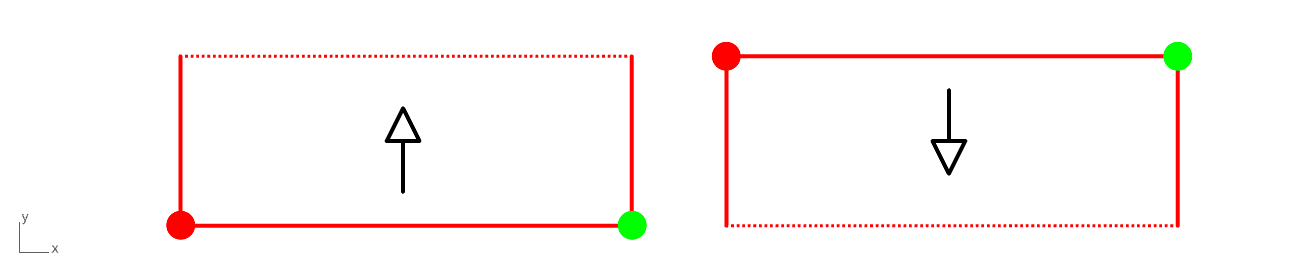
Rectangle constraint enabled: after P1 and P2 , P3 can only move
perpendicularly (upward, on the left, or downward, on the right)
| Command Name | Icon | Menu Path |
|---|---|---|
| CaptureAzimuthRectangleConstrainedOff | RhinoCapture > Azimuth > Constrain rectangle > Off |

Disables the rectangle constraint.
When the constraint is disabled, only the first point is locked in X and Y; the second point is locked only in Y, and its X position depends on the third point. P1 and P2 then define only the azimuth of the rectangle and the position of the first point: you can still determine the width and the length of the rectangle.
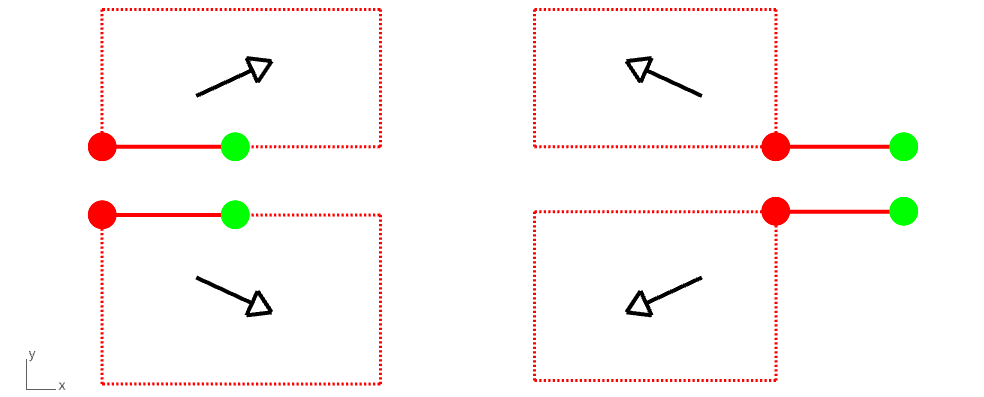
Rectangle constraint disabled: after P1 and P2 , P3 can be placed
freely; the black arrow shows the possible direction
| Command Name | Icon | Menu Path |
|---|---|---|
| CaptureAzimuthRectangleConstrainedToggle | RhinoCapture > Azimuth > Constrain rectangle > Toggle |

Toggles the rectangle constraint. See CaptureAzimuthRectangleConstrainedOn and CaptureAzimuthRectangleConstrainedOff.
| Command Name | Icon | Menu Path |
|---|---|---|
| CaptureGuideLineSetBy2Points | RhinoCapture > Guide lines > By 2 points |

Creates a guide line whose direction is defined by 2 points clicked.
| Command Name | Icon | Menu Path |
|---|---|---|
| CaptureGuideLineSetFromSegment | RhinoCapture > Guide lines > From a segment |

Creates a guide line from an existing line, or from a segment of a polyline or polygon.
| Command Name | Icon | Menu Path |
|---|---|---|
| CaptureGuideLineClear | RhinoCapture > Guide lines > Clear |

Deletes all guide lines in the “Guidelines” layer.