Snap commands
| ||
| CaptureSnap2dToggle | Turns 2D snap mode on or off. |
| CaptureSnapNextCandidate | Moves to the next candidate without moving the cursor. |
Snap to a plane | ||
| CaptureSnapOnPolygonOnce | Enables snap on polygon for one point only. |
| CaptureSnapOnPolygon | Enables snap on polygon for the duration of one command. |
| CaptureSnapOnPolygonPersistent | Enables snap on polygon until it is disabled. |
| CaptureSnapOnPointCloudPlane | Snaps the captured point to the estimated plane of the point cloud. |
Z lock | ||
| CaptureSnapZOnce | Locks Z for one point only. |
| CaptureSnapZ | Locks Z for the duration of one command. |
| CaptureSnapZPersistent | Locks Z until it is disabled. |


The 3D snaps (end, midpoint, point, near…) are those of Rhinoceros: refer to its help. rhinoCapture only adds the snaps that do not exist in Rhinoceros: 2D snap (XY on an entity, Z from the 3D cursor), snap on a polygon (Z is computed in the plane of the polygon) and Z lock.
“Constraints” display
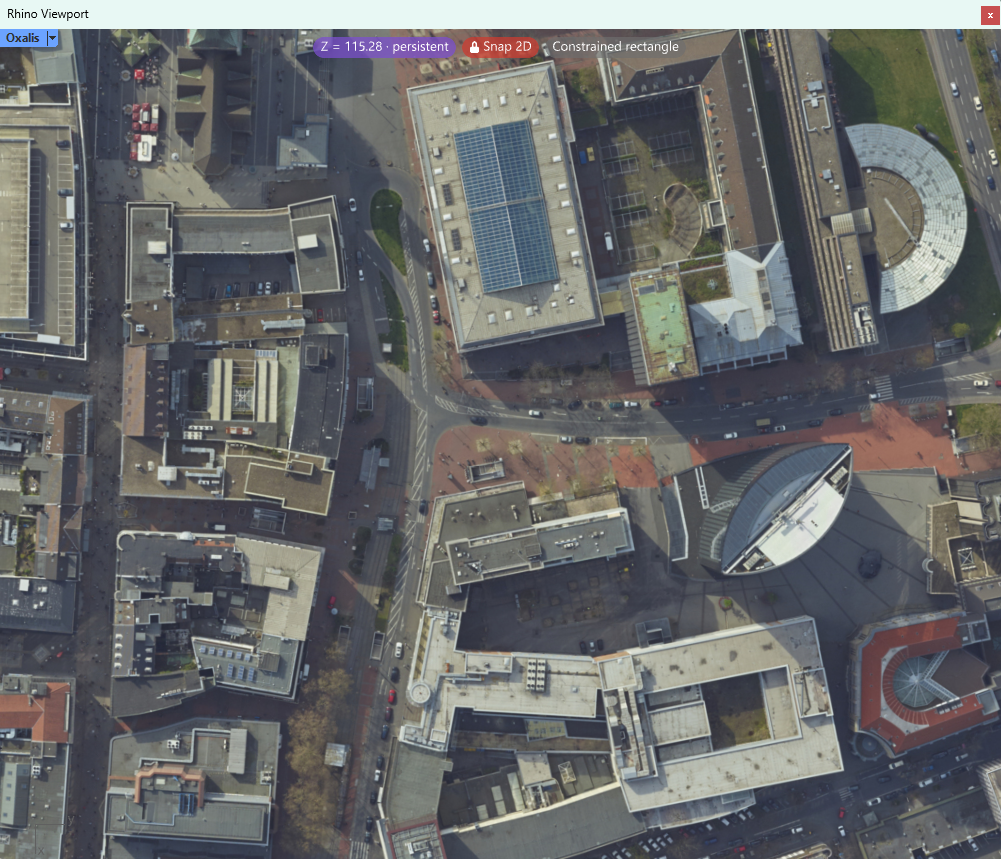
When a constraint or snap is engaged, RhinoCapture displays it as a badge at the top of the active view. A badge appears for each current constraint and disappears as soon as the constraint is released; when nothing is engaged, no badge is displayed.
The color of the badge indicates the type of constraint. For the plane, Z and Snap 2D, these are the colors of the magnets in the snap icons described above.
Badge
Meaning
Plane · persistent
Plane constraint: polygon or point cloud plane
Z = 12.35 · 1 point
Z constraint; the badge shows the elevation kept
Vertical · 1 command
Vertical constraint
Snap 2D
2D snap engaged
Constrained rectangle
Setting: rectangles are constrained by the azimuth
After the type, the badge shows the lifespan of the constraint: 1 point (it is released after the point is captured), 1 command (it lasts until the end of the current command) or persistent (it stays engaged until you release it).
A padlock before the text indicates a constraint imposed by the current command: the command, not you, engaged it, for example a vertical drawing command such as CaptureDrawPolylineVertical.
Without a padlock, the constraint was engaged by you.