
Oxalis_ViewsCreate
| Command Name | Icon | Menu Path |
|---|---|---|
| Oxalis_ViewsCreate | Oxalis > Display > Organize Rhino Views |


Oxalis\Display\Organize Rhino Views
This command automatically creates views in the Rhino environment.
| A stereo project must have been opened beforehand |
| |
When the command starts, and by default, the Rhino environment is divided into 3 views : |


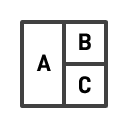
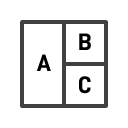
The command line is as follows :
Organize views (ViewCount=3 LeftView=Oxalis (Stereo) TopRightView=Top BottomRightView=Perspective CloseOtherViews) :
ViewCount
Sets the number of views. Select the desired value in the list : 2, 3 or 4. Depending on the selected value, the positions of the views, and therefore the options, vary :
LeftView RightView TopRightView etc.
Positioning
- With 2 views : the LeftView option controls the left part of the environment, and the RightView option the right part.
- With 3 views : the LeftView option controls the left part, the TopRightView option the upper right part, and the BottomRightView option the lower right part.
- With 4 views, the TopLeftView option controls the upper left part, TopRightView the upper right part, BottomLeftView the bottom-left corner and BottomRightView the bottom-right corner.
Views
The LeftView options, and the others, choose which view to display in the corresponding part of the environment :
to create a Top view | |
to create a Perspective view | |
to display the Oxalis stereo view | |
to display one of the existing Oxalis mono views |
CloseOtherViews
CloseOtherViews closes any existing views that have not been assigned to one of the areas of the environment.