
CaptureSnapOnPointCloudPlane
| Command Name | Icon | Menu Path |
|---|---|---|
| CaptureSnapOnPointCloudPlane | RhinoCapture > Snap > On point cloud plane |

…Sets a plane constraint from the point cloud: the plane is estimated from the cloud points around the cursor, and the points clicked afterwards have their Z computed in that plane.
The estimation is done in two passes: a first plane is computed from all points in the disk, then recomputed after discarding those that are farther from it than PlaneTolerance. The resulting plane is therefore not skewed by a verge, a ridge or a chimney entering the disk, as long as they do not occupy most of it.
Move the cursor over the surface to follow. The cloud points taken into account are displayed with a color that reflects their distance to the estimated plane, from green (on the plane) to red (at the tolerance or beyond), through the intermediate hues. A uniformly green disk indicates a reliable plane; warm hues appear where the disk spills over a verge, a ridge or an object sitting on the roof.
Click the point: the plane is kept and the constraint set, for the lifespan defined by ConstraintLifespan.
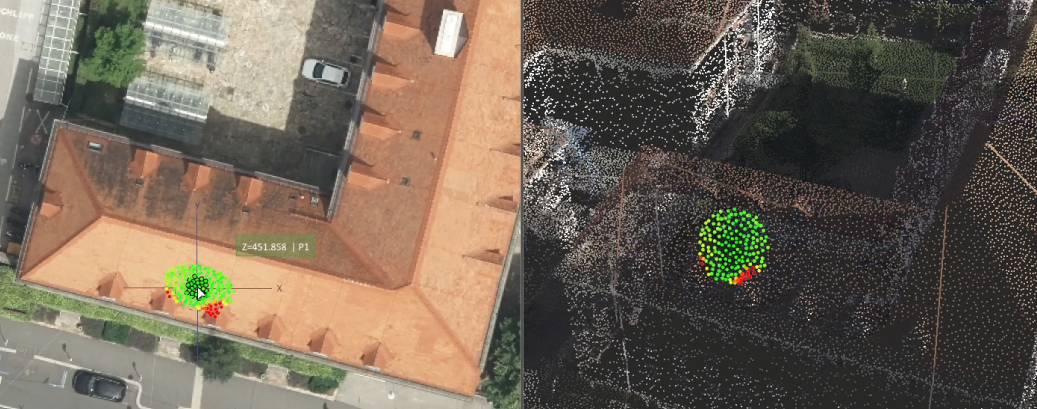
The options are:
SearchRadius
Radius, in meters, of the disk of points around the cursor from which the plane is estimated. Reduce it to follow a small roof plane; increase it to smooth a noisy point cloud.
PlaneTolerance
Distance, in meters, between a cloud point and the estimated plane beyond which the point is discarded from the final computation. It is also the color scale of the preview: the hue of each point is interpolated between green, for a zero distance, and red, for a distance equal to or greater than the tolerance; red points are those ignored by the second pass.
ConstraintLifespan
Lifespan of the constraint: OnePoint (the next point only), OneCommand (until the end of the current command) or Persistent (until disabled). See One constraint, two sources, three lifespans — the toggle rules are the same.
Z lock |
One constraint, three lifespans
The three commands CaptureSnapZOnce, CaptureSnapZ and CaptureSnapZPersistent set the same constraint: after a clicked point, of which only the Z is kept, the points captured afterwards take that Z whatever the position of the 3D cursor.
You thus give a point the X and Y coordinates of one position and the elevation of another. They differ only in the lifespan of the constraint:
CaptureSnapZOnce — : the next point only;
CaptureSnapZ — : all points of the current command;
CaptureSnapZPersistent — : all points, command after command, until removed.